Καλησπέρα παιδιά. Θέλω να ηχογραφήσω ένα τραγούδι με το συγκεκριμένο πρόγραμμα. Θέλω να παίξω στο μπουζούκι ένα κομμάτι και μετά να τραγουδήσω πάνω στην συγκεκριμένη μελωδία. Παρέχει αυτή τη δυνατότητα αυτό το πρόγραμμα? Και με ποιο τρόπο?
Χρησιμοποιώ αυτό το μικρόφωνο
Υ.Γ.Επειδή το έχω χρόνια αυτό το πρόγραμμα, έχει βγει και πιο καινούρια έκδοση?
Το audacity έχει φτάσει στην έκδοση 2.04 και μπορείς να το κατεβάσεις από εδώ. Φυσικά και το παρέχει, μόνο που θα πρέπει να έχεις ακουστικά ώστε να απομονώσεις τα ηχεία γιατί αλλιώς το μικρόφωνό σου θα πιάνει και τον ήχο που θα βγάζουν τα ηχεία.
Πρέπει να υπάρχει έκδοση 2.04 πλέον. Δεν νομίζω ότι για τη δουλειά που το θέλεις έχει κάποια διαφορά.
Δεν το έχω πρόχειρο το πρόγραμμα μπροστά μου αλλά απ’ ότι θυμάμαι απλώς ανοίγεις νέο κανάλι ηχογράφησης (αφού γράψεις το μπουζούκι) από κάτω και ηχογραφείς τη φωνή. Κατόπιν παίζοντας και τα δύο μαζί έχεις το επιθυμητό αποτέλεσμα. Σου δίνεται και η δυνατότητα με τις κουκίδες που έχει πάνω στο ηχογράφημα να αυξομειώσεις την ένταση του ενός ή του άλλου. Τέλος το εξάγεις σαν mp3 και έχεις το ζητούμενο.
Δεν θα έτρεχα να απαντήσω έτσι γενικά, αλλά φαντάζομαι ότι είσαι σε δημιουργικό οίστρο. Ελπίζω να βοήθησα.
Έχω χρησιμοποιήσει το 1.3 για διάφορες ηχογραφήσεις. Είναι οικιακού επιπέδου, αλλά νομίζω ότι το πρόγραμμα παρέχει τη δυνατότητα και για υψηλότερων αξιώσεων αποτέλεσμα, για όποιον είναι λίγο σε θέση να εκμεταλλευτεί όλες τις δυνατότητες.
Για κάποιο λόγο, που μάλλον σχετίζεται με τον υπολογιστή μου και όχι με το ίδιο το πρόγραμμα, όταν γράφω ένα κανάλι ακούγοντας το προηγούμενο που έχω ήδη γράψει υπάρχει μια χρονοκαθυστέρηση (αυτό που είναι ταυτόχρονο όσο παίζω, στην ηχογράφηση δεν είναι). Η απλή και πρακτική λύση είναι στο πρώτο κανάλι να ηχογραφώ έναν οδηγό. Για κάθε επόμενο κανάλι ακούω μόνο τον οδηγό και παίζω/τραγουδάω από πάνω. Η χρονοκαθυστέρηση είναι φυσικά η ίδια για όλα τα κανάλια, επομένως βγαίνουν συγχρονισμένα μεταξύ τους. Τον οδηγό τον πετάω.
Η καθυστέρηση σχετίζεται και με το πρόγραμμα, πιο εξειδικευμένα προγράμματα πολυκάναλης ηχογράφησης λαμβάνουν υπόψη αυτή την καθυστέρηση και ευθυγραμμίζουν από μόνα τους τα κανάλια. Δεν υπάρχει υπολογιστής που να μην έχει έστω και λίγη καθυστέρηση καθώς η μετατροπή του σήματος από αναλογικό σε ψηφιακό, το γράψιμο στη μνήμη κλπ παίρνουν κάποιο χρόνο.
Has anyone used Audacity to digitise vinyl from an older turntable without a USB port? I’ve found some videos with instructions for exactly this, but they’re not using the same version as me (Audacity 3.2.5), so they say “click here” and I don’t have anything here, or I don’t have the same options…
You pass the analogue sound from the mic, or stereo, etc.
You feed it into the computer through the mic in or the line in of the sound card, or wherever you have a line input.
From this point on, the „analogue sound“ is in digital form (PCM, AIFF, etc.).
These formats are linear (uncompressed).
This takes up a lot of MB.
Once you’ve finished with whatever processing you’re going to do, you decide which compressed format to save it in, e.g. MP3, FLAC, Windows, etc.
So far, so good. But to get the signal into Audacity 3.2.5, I need to change some settings, and I can’t find them because all the instructions I’ve found are for other versions of Audacity. So, no sound is coming through!
the same applies to all “audio tools”.
In Audacity (as in the others), there should be an option somewhere to select the sound card.
Press the red (record) button and you should see the VU meters “fill up”.
From your stereo, or something else, use a jack plug in your computer’s line-in.
α. The turntable has the familiar split RCA cable coming out of it, with the red and white plugs.
β. Normally I would plug this into a cable with two corresponding female plugs, but such a cable is very hard to find, so I got another male one and connected the two male plugs via the so-called coupler (γ). The coupler is an adaptor with female RCA sockets on both sides. The other end of this cable terminates in a jack plug.
δ. I plug the jack into a little gadget whose name I can’t remember, but it has two jack sockets (a microphone input and a headphone output), a USB plug at the other end, and the whole thing is small, like a USB stick. So I put the jack into the microphone input.
ε. I connect this little gadget to the computer.
I open Audacity, put on a record, press rec and… nothing comes in! I record silence.
So I assume it’s an Audacity settings issue.
I include stage δ because the computer (laptop) doesn’t have a line-in socket. However, I was told that the speakers’ socket can do the same job. So, as an alternative route, I tried plugging the jack on cable β directly into the speakers’ output, without the little gadget δ in between, and still nothing happened.
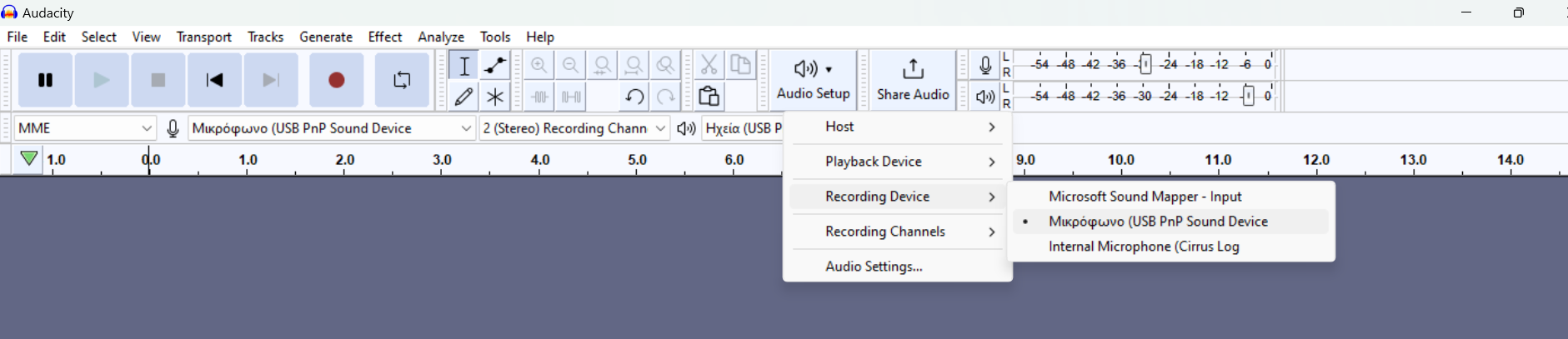
Here I clicked on Audio setup, then Recording device, and none of the three options works. However, in the videos I watched, using different versions of Audacity, the options under rec. device were different.
These two (black and red) need to go through an RIAA preamplifier (equalisation, or correction of the record’s bass and treble).
They must not be connected directly to the computer (no computer has an RIAA preamplifier).
or
We connect the turntable’s black and red plugs to a stereo system, which usually (almost always) has an input for a turntable.
From the stereo system’s REC OUT or headphone output, we connect to the computer’s line input.
That would have been my logical conclusion too. However, this guy, here, for example, does it using just the turntable. Others do the same, while I found one who explicitly says, “don’t do it like this straight away”, not because it’s technically impossible, but simply because the sound quality will be poor.
But if I’m not getting any sound at all, then something else must be at fault.
I don’t want to use the other method, via a stereo system connected to the headphone output. I’ve done that in the past. The sound is heavily distorted, and trying to minimise the distortion requires an awful lot of testing.
Oh, Pepe! The video you watched uses the Audio-Technica
AT-LP60, which has a built-in preamp!
Yes, there are such things if you don’t have a stereo system available.
From the description (prospectum) of the
AT-LP60
“With its built-in switchable phono preamp, the AT-LP60 may be connected directly to your computer, home stereo, powered speakers and other components”
Since you started the topic…
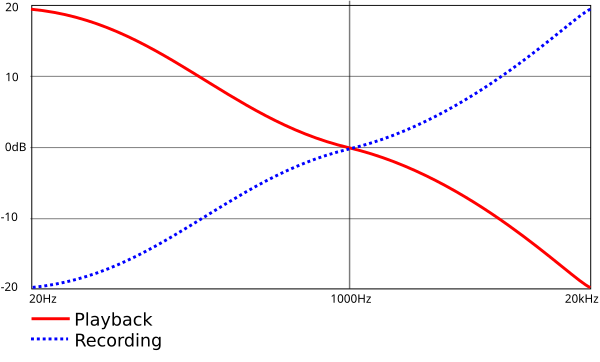
here we can see what happens during the production of LPs and why we need to use a preamp (RIAA equaliser).
I’m feeling a bit deflated now. I’ve spent the last couple of weeks scouring the city for all the various cables and adapters, little gadgets costing just a few euros but nevertheless difficult to find, based on this misunderstanding about the preamp…
Life has become far too complicated, though. In the old days, we didn’t need an encyclopaedia to record a cassette from a record. Nor did we during the brief period when CD recorders were fashionable: something like a cassette deck that recorded CDs from a record, back when CDs were exclusively for audio and had nothing to do with computers yet, because computers used floppy disks and lived in a different universe from all manner of audio equipment.
A basic sound card with two preamps will do the job. Then you apply the RIAA curves and so on after the computer. Mine burned out; if I still had it, I’d lend it to you. I’ve found some good options in older models in the classifieds at good prices, as people are replacing them with newer ones.
Right, it didn’t last very long. I went to sleep, woke up, it was a new day, and now let’s see what positive things remain:
I finally understood, if not completely, then at least at a preliminary level, what preamplification actually is. I understood why old stereo amplifiers, back when the turntable was standard, took the signal directly but through a special input, Phono, rather than through one of the various line-in inputs, whereas later models require a preamplifier. And, finally, how modern turntables can have a USB input on them rather than on the amplifier. Things I’ve been looking at right in front of me for years, but simply accepted without understanding.
In the end, preamplification is something inevitably necessary for a turntable, and it is always there, either in a separate device, or built into an old-style amplifier or a modern-style turntable.
Does an RIAA preamp provide amplification (from a weak signal to line level)? Microphone preamps and the like do that too. Does it perform equalisation? In theory, you can also do that in software, provided the equaliser works well enough. But might it also perform impedance matching? (What do we call that in Greek, anyway?)
we call it “impedance matching”.
connecting a gramophone cartridge (pickup) to a mic input abuses this matching “condition”.
cartridges (that’s the part with the stylus, as we call it) need to “see” an input impedance of 47 kΩ or more.
the input impedance in the mic position is only 1 kΩ.
there goes the impedance matching .
(I think we’ve strayed quite far from the Forum’s topic, but perhaps we’re still on topic because it has to do with playing records.)

 .
.